Finally Submitted!

Thankfully, our virtual team project was finally submitted on Monday. This project was a roller-coaster and I found the student experience very different from the workplace.  The deliverable was very simple, but the journey had many elements and overall, I feel this comprehensive project is worth including in our MA program.  Project management, collaboration with colleagues, communication skills, use of technology, writing, editing, translating, critical thinking and graphic design were among the skills needed on the team for a successful outcome.
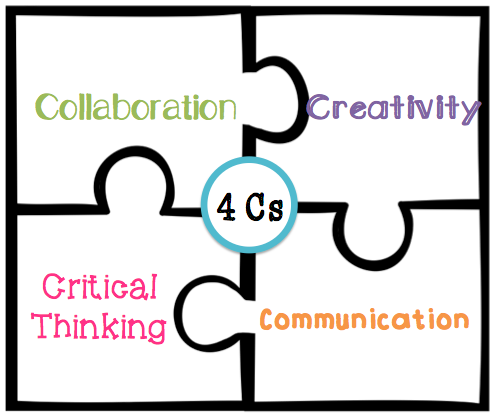
The 4 C’s of Education, certainly needed on this project

What new skills skills have I developed?

I have a better understanding of how to write for translation from working on this project. It’s an important skill for technical communicators and something I have never thought about before.

I wrote part of the instructions and I know I did a good job, there was only one edit, however, I did learn from our editors on this project. They did a great job creating a style guide once they realised how disparate some of the writing was and worked hard to make the document feel like it came from one writer. They were meticulous with wording and taught me how to keep everything consistent throughout the document and eliminate unnecessary words. This is something I have been working on since September!

I have also learned how to approach project management and clearer guidelines should have been set out from the start. I found this great article on creating a style guide, design information and documenting the process which would have been a really useful guide for us.

Leadership on our project

We had a leader for each university on our team and in hindsight we should have had an overall project manager. As the team leader for the UL side I got the project started and created a project plan. As we had no overall manager, checking in with everyone took a lot of time and the editors were left with a lot of the decision making. One of the Paris students never engaged so their leader was our only contact point for translation. In Florida one of the students was very engaged and the others less so.

Project Management tools & collaboration with translators

Overall the tools worked well. We used Big Blue Button for calls and Slack to collaborate. I also developed a Gantt chart at the start of the project which clearly showed the due dates, holidays and task list which was very useful.

The lead translator was on the initial conference calls, but she had no experience ‘writing for translation’ and had no advice to offer.  She was involved in choosing the topic and took a step back during the writing process. Engagement was poor during the translation phase until the very end of the project where she needed a couple of clarifications on sentences using Slack. Slack was our main collaboration took and generally worked well. It did get a little confusing at times and would have worked better with an updated action list. Slack was useful for feedback between the writers and editors and we set up private channels for this task.

We also used Google Drive for storing each version of the document and adding comments for editing which worked well in conjunction with Slack. No-one else on the team had access to the graphics tool chosen by the designer, until late in the project when one of the Florida students got access through her workplace so she could make necessary changes.

Creativity

Freedom to choose a topic, assign roles, select tools and develop our own plan is one of the strengths of this project. It forces collaboration and decision making from the beginning and teams must take responsibility for choosing their own path. It’s also a great opportunity to use new tools for a real project.

The graphic design element of the project should have been more creative. This never happened on our team unfortunately, one of the students had experience in graphics and put himself forward for that role. There was little engagement with the rest of the team on design and most of the feedback was never implemented.

The most valuable lesson I learned

I have managed my own team in the past, but never multidisciplinary teams. This project has taught me the importance of teams having clear guidelines on everyone’s roles within the team and exactly what is expected of each person, how they will communicate and collaborate with the rest of the team. Additionally, having a key decision maker in the group would have been useful for final sign-off of the document at various stages.

What to do differently

Hindsight is fantastic and having two graphic designers on the team should have made a big difference to the success of the project.

A master document to track all actions, no matter how small they were, would have worked well. There were times towards the end of the project when members were making the final updates which had been agreed on Slack, yet some of the tasks weren’t complete or there was confusion over exactly what needed to be done.

A style sheet was developed after the first writing phase. This would have been more useful before we started writing.

Motivation during the project

I was really motivated for most of this project, as we had good engagement, created solid relationships and developed well-written instructions. I like being part of a team and sharing achievements is great when everyone is working hard to realise the goal. At times it was difficult to keep motivated as we were so badly let down by the graphics designer towards the end of the project. It was really demotivating for the editors to have all their work ignored on the first design draft and I felt their pain. The designer going for two weeks holidays without giving notice to the rest of the team and saying they were only putting 20% effort into this project because that was all it’s worth was certainly unhelpful. I am disappointed with our final submission, which is demotivating for many on our team due to the amount of time spent on the project and we know this will affect our grade.

Completing projects with remote workers will be part of everyone’s future and I’m glad we had this opportunity. I feel more competent about anticipating issues that may come up in the future in a similar project. Those who disengaged from this process certainly lost out on valuable learning.

References


Hollis Weber, J. (2011)
Developing a Departmental Style Guide TechWhirl.com, available at https://techwhirl.com/developing-a-departmental-style-guide/ [last accessed 1 April 2019]

Wrapping up the Virtual Team Project

This is the penultimate week of our virtual team project and it’s been testing for most of our group. Perfecting teamwork is a challenge. We have had various levels of engagement over the past few weeks. Some team members have worked really hard on the project, I think the editors probably contributed the most. Some teams members are great at keeping in touch on Slack, others don’t. We have had sporadic updates from one of the French team. The other student hasn’t engaged.

Our graphic designer changed all the text and left us with a document that we couldn’t edit and went on holidays. That was the low point until he commented that he was only giving 20% to the project as that’s all its worth. We’ve sunk even lower.     

One of the US students, who has been great throughout the project got access to the editing software and had a list of issues to fix. Great news, until she sent back the document with graphics are all over the place, no numbering for each step and section 3 was still incorrect. It’s now 48 hours before the deadline and we have no cover page, no alignment on the graphics, no numbering and most of us are losing the will!

I understand why we are doing this project and ultimately it’s very beneficial. It’s also very frustrating. Cleary and Slattery’s (2009) article on virtual teamwork has “uncooperative and non-participating team members” recorded first on their list of challenges for students on this project. My experience defiantly concurs. Work experience has also been a challenge for us. Apart from one or two part-time students there is very little experience on our team with the different stages of this project. In hindsight we should have designated a project manager rather than a project lead from each site.

What has been good to see over the past few days is most people are pulling together and some of the student who rarely engaged much are now asking how they can help. Hopefully our document will be in better shape by Monday evening. After all the planning, writing, editing and time spent it would be a shame if it’s not at least 80% good enough.

References

Cleary, Y. and Slattery, D. (2009) ‘Virtual teams in higher education: challenges and rewards for teachers and students’, in 2009 The All Ireland Society for Higher Education, available: https://ulir.ul.ie/bitstream/handle/10344/7268/Slattery_2009_Virtual.pdf?sequence=1 [last accessed 23rd March 2019]

Should you Storyboard a website?

In EL6072 we are required to create a digital resource using Dreamweaver. The first part of this process was to write a proposal and storyboard. I have heard of storyboarding in the context of film and wasn’t really sure how relevant and useful it would be in our industry. We learned that a storyboard is a visual layout and sequence of a digital resource. In our assignment we were required to submit an overview and several pages of the resource, show how they would link together and write a proposal detailing our design. All our choices had to be backed up  with reference to literature.

This is going to be so much work, will it be worth it? It turns out that storyboarding is really useful and makes you think about all aspects of your resource. It forces you to make decisions early on. As you are mapping out how the resource will look, you start to think about typeface, font size, colours, use of visuals and other aspects of your content. There is so much to choose from. The essence of the resource will come through in the writing and visual style, so you need to decide on a ‘look and feel’. How the navigation will work and which objects stay on each screen becomes really important and you have decisions to make on being interactive and site accessibility. I found the advice from literature conflicting at times. Sometimes you just need to make a decision and stick with it.

There are many advantages to creating a storyboard:

  • It reduces rework. Building your site and having to back track because you haven’t figured out all the details will be costly and frustrating.
  • It will communicate to others what the finished product will look like. This is especially useful if you are working with a team or a client.
  • It helps you think of the user experience. Usability is so important, users will leave your website if it’s difficult to navigate. I found the Neilson Norman Group website has lots of great articles on usability.
  • It improves the quality of your work. Everything is documented and available when you start to create your website.

Yes its time-consuming, but I can see the value of storyboarding for a website or e-learning resource.

Where is all the text gone?

“Graphic Design uses visual media such as pictures, decorative words or animations to convey a message” according to the American Institute of Graphic Arts (AIGA). In our virtual team project, one member took on the role of graphic designer of the instructions we developed. I have previously written about the challenges of this project and for me, the biggest challenge remains the same. What is everyone’s role and how do we work together to achieve the best end product?

The role of the technical writer has changed since in the last 20 years due to the internet and globalisation. We are now technical communicators and information design is a key function of the job. The function of the text has been reduced. Think of the signs and symbols you see every day for no parking or exits, or the textless IKEA instructions for your new Billy bookcase. Videos and podcasts are becoming more and more popular for customer help and support. That’s all great for the future but this deliverable is mainly about the text.

Our team project is focused on creating a set of written instructions of at least 900 words to be translated into French. That was the brief. We have a team of writers who wrote different sections of the text. Our two editors worked really hard to fix the mistakes, reduce the word count and give the text a consistent feel. We agreed on a style and were excited to see the finished product complete with graphics. First impressions were great. Great colours, lots of white space, clear layout, text boxes and screenshots are all aligned. Wait a minute, where is all the text gone? 1000 carefully chosen words that had been rewritten and tweaked for a week were unrecognisable. Now we had pieces of incomplete text with incorrect grammar, no structure or flow. The graphic designer thought this was a ‘quick reference guide’. It’s not! Read the assignment brief!

It all comes back to communication and assumptions. We assume that everyone knows their role. The graphic designer should take the content and make it graphically more presentable, not fit parts of the text into a template. I never envisioned this could be a problem. Another great lesson this project has taught me is how to approach working with a graphic designer.

My top five guidelines for working with a graphic designer

Establish timeframes.

Set deadlines for the first draft and each subsequent stage.

Provide background information.

The more information you provide about the audience and use of the item to the designer will help them create a useable product.

Review the first draft.

It may not be perfect. Give the designer specific feedback on the components so they have a clearer vision for subsequent drafts.

Collaborate.

Ask questions, e.g. why did you choose that image or colour? Maybe you are missing something.

Be realistic.

Know when to say ‘we’re done’. It may not be perfect, but it may be good enough.

Contemplating Writing

"When you know better, you do better" Maya Angelou

I'd Rather Be Writing - Tom Johnson

Technical Communication Blog / Technical Writing Blog

Community – Edublogs – free blogs for education

"When you know better, you do better" Maya Angelou

TWO WRITING TEACHERS

A meeting place for a world of reflective writers.

Blog of Stuff for Digital Education

Your home for the mad ramblings of a Higher Education student

Learning with 'e's

"When you know better, you do better" Maya Angelou

Design a site like this with WordPress.com
Get started